Television satellites are located in fixed positions above the Earth’s equator and beam TV signals down to certain regions of the planet (not worldwide). To receive TV signals from a satellite to your
TracVision M3-DX, you must be located within that satellite’s unique coverage area.

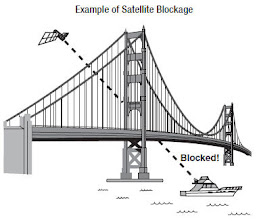
In addition, since TV satellites are located above the equator, the TracVision M3-DX antenna must have a clear view of the sky to receive satellite TV signals. Anything that stands between the
TracVision M3-DX antenna and the satellite can block the signal, resulting in lost reception. Common causes of blockage include trees, buildings, and bridges. Heavy rain, ice, or snow might also temporarily interrupt satellite signals.
 Turning the TracVision M3-DX System On/Off
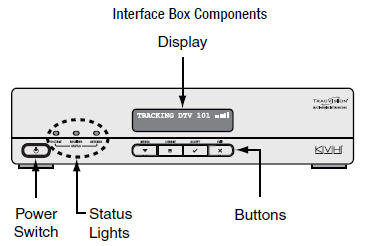
Since the interface box supplies power to the antenna, you can turn the antenna on or off using the interface box Power switch.
Turning On the TracVision M3-DX SystemFollow the steps below to turn on your TracVision M3-DX system.
1. Make sure the TracVision M3-DX antenna has a clear view of the sky.
2. Turn on your satellite TV receiver and TV.
3. Press the Power switch on the front of the TracVision M3-DX interface box.
4. Wait one minute for system startup.
Once the
TracVision M3-DX antenna finds the correct satellite, all three status lights on the interface box should be lit green.
Turning Off the TracVision M3-DX SystemFollow the steps below to turn off your
TracVision M3-DX system.
1. Press the Power switch on the front of the TracVision M3-DX interface box.
2. Turn off your satellite TV receiver and TV.
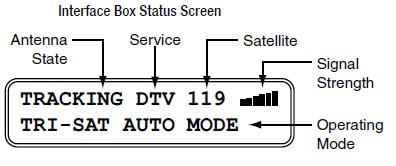
Understanding the Status ScreenFollowing startup, the interface box displays the current system status.
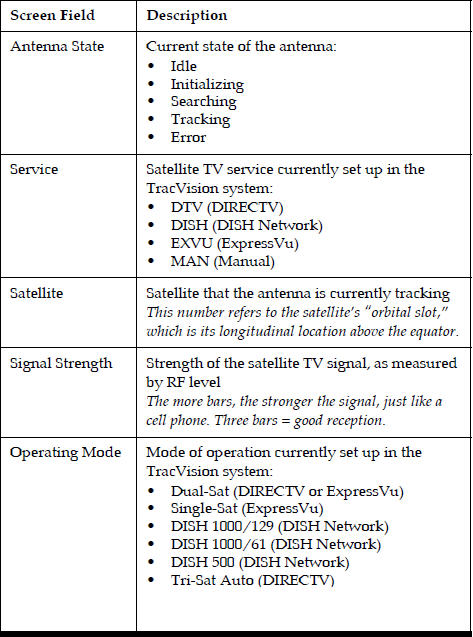 Switching Satellites
If your
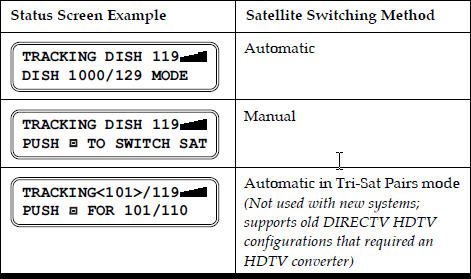
TracVision M3-DX system is set up to track multiple satellites, you can easily switch between them. Use the switching method that applies to your particular setup. You can identify the current satellite switching method by the format of the status screen:
 Automatic Switching
All operating modes provide automatic satellite switching using the primary receiver (the receiver connected to the “Unstacked Output” jack on the interface box). The
TracVision M3-DX antenna will automatically switch satellites as you change channels using the primary receiver’s remote.
NOTE: The TracVision M3-DX receiver might take up to 30 seconds to display video when changing channels, switching between satellites, and/or switching between standard-definition and high-definition channels.NOTE: DISH Network receivers may switch to a different satellite on their own in response to a blockage condition. For example, if the TracVision M3-DX antenna’s view of the 110 satellite becomes blocked for over a minute, the TracVision M3-DX receiver may try switching to the 119 satellite. If this occurs, you will see an error message on the TV. Once the TracVision M3-DX antenna can see the selected satellite again, the receiver will automatically switch back and the error message will disappear.How Switching Satellites Affects Additional ReceiversThe
TracVision M3-DX system tracks one satellite at a time. Therefore, if you switch satellites using the primary receiver, televisions connected to other receivers might display different programming, no programming, or an error message. Simply select a channel carried by the new satellite, or use the primary receiver to switch back to the original satellite. Only the primary receiver controls satellite selection.
DIRECTV Tri-Sat Auto Mode Requires Tri-Sat AutoSwitchIn Tri-Sat Auto mode, the
TracVision M3-DX antenna will automatically switch among the 101, 110, and 119 satellites as you change channels using any receiver that is equipped with a Tri-Sat AutoSwitch (receiver model H21-200 or H20-600 required).
Manual SwitchingIf you set up the
TracVision M3-DX system to track a custom set of satellites in Manual mode, you can use the interface box to switch among them. Simply press the CHANGE button until the display shows the desired satellite. Then press ACCEPT.
 Changing the Satellite Switching Mode
Unless your system is set up in Manual mode, the
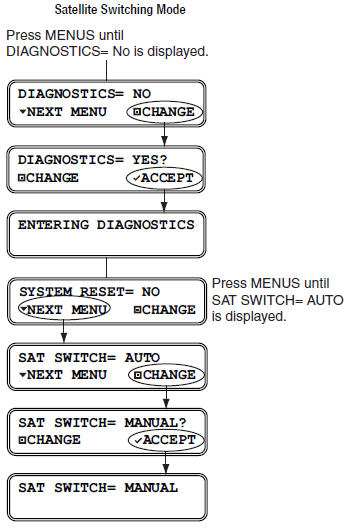
TracVision M3-DX antenna will automatically switch satellites as you change channels using the receiver’s remote control. However, if you want to manually select a satellite for some reason, the interface box allows you to switch from automatic to manual switching. (You can also switch back to automatic switching using this same menu function.) Follow the steps in the flowchart below to change the satellite switching mode.
 Product Care
Please consider the following
TracVision M3-DX antenna care guidelines for maintaining peak performance:
- Periodically wash the exterior of the TracVision M3-DX antenna dome with fresh water and mild detergent. Avoid harsh cleansers and volatile solvents (such as acetone) and do not spray the dome directly with high-pressure water.
- If you wish to paint the dome, use only non-metallic automotive paint without a primer coat. Any paint that contains metal will block satellite signals and impair reception.